PCI DSS 6.4.3 and 11.6.1 (2026): What Ecommerce Merchants Must Do
PCI DSS v4.0.1 Requirements 6.4.3 and 11.6.1 are mandatory for SAQ A-EP and SAQ D merchants, and were removed from SAQ A in January 2025. Here's what they ask for and what to do about it.
Requirements 6.4.3 and 11.6.1 are mandatory for merchants filing SAQ A-EP or SAQ D. 6.4.3 asks you to inventory, justify, and integrity-check every script on your payment page. 11.6.1 asks you to detect unauthorised changes to that page. SAQ A merchants were released from both in January 2025, and swapped them for an attestation.
Both requirements target the same threat: malicious scripts injected into payment pages to steal card data as customers type it. Both have concrete, testable criteria.
Which SAQ you file changes what you owe here, and the January 2025 revision changed the answer for a lot of merchants. Start there.
Which SAQ types do 6.4.3 and 11.6.1 apply to?
SAQ A-EP and SAQ D: mandatory. SAQ A: not required. The January 2025 SAQ A revision (v4.0.1 r1, effective 31 March 2025) removed 6.4.3, 11.6.1, and 12.3.1 from SAQ A. In their place sits an eligibility criterion you self-attest to: that your site is not susceptible to script attacks.
Read that criterion again, because it is doing more work than it looks like. The requirements came off the form. The need for a defensible answer did not.
Which of the two forms you actually file is decided by one question about your checkout, and the 10-minute SAQ A vs SAQ A-EP decision guide walks it.
You can satisfy the attestation two ways: written confirmation from your payment provider, or the controls described below. In practice the controls are easier to evidence than the confirmation, which is why plenty of SAQ A merchants implement 6.4.3 and 11.6.1 anyway and treat the attestation as a by-product.
The January 2025 changes did not remove Requirement 11.3.2, the quarterly ASV external vulnerability scan. That one stayed in SAQ A. If you read the "requirements removed from SAQ A" headlines as dropping your scanning obligation, see does SAQ A require quarterly ASV scans. It is the single most common misreading of that revision.
Does 6.4.3 apply if you use Stripe, PayPal, or Shopify Payments?
It depends on how the processor is wired into your checkout, not on which processor you picked. The same provider can put you in SAQ A or SAQ A-EP depending on where the card fields actually live.
The question to answer is simple: do card inputs sit in your own HTML, or inside an iframe served by the processor? If your page renders the input, any other script on that page can read what the customer types, and the script requirements apply.
| Integration | Card fields live in | Typical SAQ | 6.4.3 / 11.6.1 |
|---|---|---|---|
Stripe Checkout (redirect to checkout.stripe.com) |
Stripe's own page | SAQ A | Not required |
Stripe Elements / Payment Element (js.stripe.com/v3/) |
Cross-origin Stripe iframe | SAQ A | Not required |
Stripe.js v2 (js.stripe.com/v2/) |
Your HTML | SAQ A-EP | Required |
| PayPal JS SDK, buttons only | PayPal | SAQ A | Not required |
PayPal JS SDK with components=card-fields |
PayPal iframe | SAQ A (some assessors say A-EP) | Confirm with your QSA |
| Shopify Payments / hosted checkout | Shopify | SAQ A | Not required |
| Custom form posting card data to an API | Your HTML | SAQ D | Required |
Three things merchants get wrong here:
Stripe.js v2 is the trap. It puts card <input> elements in your own DOM, which is SAQ A-EP. Stripe deprecated it in 2017 and WooCommerce force-migrated installs away from it in 2024, so it is rare — but if you find js.stripe.com/v2/ on your checkout, your scope is wider than you think and the fix is an upgrade, not a policy.
Self-hosting the processor's script breaks SAQ A eligibility. js.stripe.com has to be loaded directly from Stripe. Bundling it, proxying it, or serving a copy from your own domain means the integrity guarantee no longer comes from the processor, and your assessor is entitled to treat the page as in scope.
SAQ A is not a free pass. The requirements came off the form, but SAQ A eligibility now rests on self-attesting that your site is not susceptible to script attacks. A page loading eleven third-party scripts alongside the payment iframe is a hard place to defend that attestation from. Knowing what runs on your checkout is the same work either way.
If you are unsure which mode you are on, our free Webpage Security Checker reports the processor integration it detects on your checkout. That result is a starting point for the conversation, not a compliance determination — the SAQ you file is your decision, and your acquirer's.
Why do these requirements exist?
The Magecart attacks that hit British Airways (380,000 cards), Ticketmaster (40,000 cards), and hundreds of thousands of SMB ecommerce stores share a common mechanism: a malicious JavaScript snippet quietly appended to the payment page that exfiltrates card data as customers type it.
What made these attacks so damaging was how long they went undetected, weeks to months in most cases. The payment processor never saw anything unusual. The web server logs were clean. The card data disappeared entirely at the browser layer, before it was ever submitted.
PCI DSS v4.0.1 Requirements 6.4.3 and 11.6.1 exist specifically to close that gap.
What does Requirement 6.4.3 require?
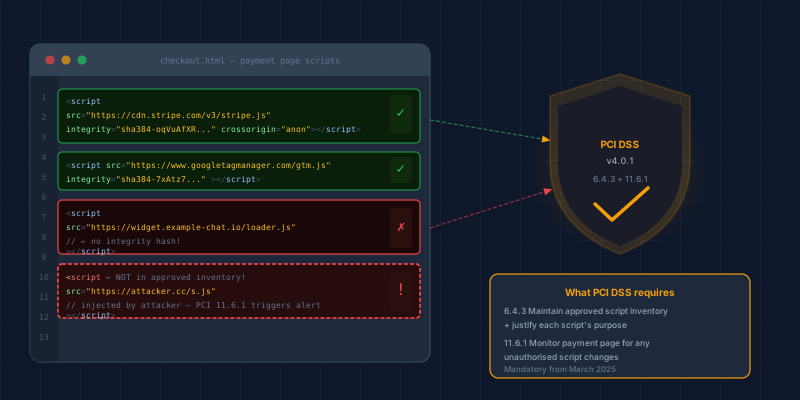
Requirement 6.4.3 applies to all scripts loaded by the payment page, including analytics, chat widgets, and A/B testing tools, not just payment-related scripts.
Requirement 6.4.3 has three sub-requirements:
6.4.3.a Inventory: Maintain a documented list of every script authorised to execute on the payment page, including its purpose and who approved it.
6.4.3.b Integrity: Implement a method to confirm that each script has not been tampered with. Acceptable methods include:
- Subresource Integrity (SRI): add an
integrityattribute to<script>tags pointing to third-party files. The browser verifies the hash before executing. - Content Security Policy (CSP): restrict which script sources are permitted, using
nonce-based orstrict-dynamicpolicies. - Script monitoring service: a third-party service that alerts on unauthorised script changes.
6.4.3.c Written justification: Every script on the list must have documented business justification for why it needs to be on a payment page.
What this looks like in practice
A Shopify store that uses Google Analytics, Facebook Pixel, a live chat widget, and Shopify's own checkout scripts might have 8 to 12 scripts loading on the payment page. Under 6.4.3, you need a written inventory like:
Script: Google Analytics (analytics.js)
Source: https://www.google-analytics.com
Purpose: Conversion tracking
Approved by: [name], [date]
Integrity control: CSP allowlist (google-analytics.com)
For scripts you host yourself or load from a CDN you control, SRI hashes are the cleanest solution. For third-party scripts that update frequently (where pinning a hash breaks when the vendor releases an update), CSP allowlisting is more practical.
If you use Shopify, BigCommerce, or another hosted platform, the platform controls most scripts on the checkout page and assumes compliance responsibility for them. Your obligation is to document that you've confirmed this, and to manage any additional scripts you've added yourself (pixel tags, chat widgets, etc.).
Those pixel tags raise a second question the platform does not answer for you: when do they fire? On a default Shopify setup they transmit before a shopper has answered the cookie banner. That is a privacy problem rather than a PCI one, and it has its own fix.
What does Requirement 11.6.1 require?
Requirement 11.6.1 requires deploying a mechanism that detects unauthorised modifications to HTTP headers and the content of the payment page. Specifically:
- The mechanism must be capable of alerting on changes to HTTP security headers (CSP, SRI, X-Frame-Options, etc.)
- It must detect changes to page content that could indicate script injection
- Alerts must be reviewed at least weekly (or more frequently depending on risk)
11.6.1 is not satisfied by your existing monitoring or alerting stack. A CloudWatch alarm on 5xx errors does not detect a silently-injected skimmer script that never causes server errors.
Acceptable approaches include:
- Script monitoring services (e.g. Featurespace, c/side, Jscrambler) that baseline your payment page and alert on changes
- Automated integrity checks that diff the payment page HTML/scripts on a schedule and alert on unexpected changes
- Browser-side telemetry from a CSP
report-urithat surfaces policy violations
A "check it weekly by hand" approach technically satisfies the letter of 11.6.1 if you document it, but it will not reliably detect a fast-moving attack and will not impress a QSA.
How do you know whether you have a gap?
Work through five questions. Your controls meet the letter of 6.4.3 and 11.6.1 when the answer to each is yes.
- Do you have a written inventory of every script on your payment page?
- Does every script have a documented business justification?
- Is there a technical control (SRI, CSP, or a monitoring service) that would detect if any script was modified?
- Is there an automated mechanism that would alert you if the payment page content or HTTP headers changed unexpectedly?
- Is that alert reviewed at least weekly?
A "no" anywhere is a gap worth closing whichever SAQ you file, because the risk it describes does not care which form you submit. Question 1 is the one merchants most often fail, and it is the cheapest to fix.
What is the fastest path for a small merchant?
For a Shopify or WooCommerce store on a limited budget:
- Audit your payment page scripts: use browser DevTools (Network tab, filter by JS) to enumerate every script that loads. This takes 20 minutes. On WooCommerce, a free plugin will write the inventory for you in about five.
- Document the inventory: a Google Sheet is fine for this. Name, source URL, purpose, approval.
- Remove scripts you can't justify: if you can't answer "why does this need to load on the checkout page?", remove it. This also reduces your attack surface.
- Enable CSP headers: your hosting provider or CDN (Cloudflare, Vercel, etc.) can add these. A basic allowlist policy dramatically limits what can execute.
- Add SRI hashes to self-hosted scripts: generate hashes with srihash.org and add
integrityattributes to your<script>tags. - Set up weekly automated diffing: a simple script that fetches your checkout page and diffs it against a baseline is enough to satisfy 11.6.1 on a budget.
CyberShield Studio's free Webpage Security Checker identifies missing CSP headers, missing SRI attributes, and other 6.4.3/11.6.1 risk signals on any merchant URL, no account required.
What if your ASV scan comes back failing?
Different requirement, same bad week. Requirement 11.3.2 is the scanning obligation SAQ A kept, and a failing scan blocks your submission until you either remediate the findings or successfully dispute them.
Three guides cover that process end to end:
- How to read a failing ASV report and prioritise what to fix, including what CVSS scores actually mean for your deadline.
- A recovery plan for a failed scan, which works the 90-day clock backwards from the deadline.
- How to dispute ASV findings. False positives and compensating controls are a legitimate route, and most merchants never use it.
Where to start
Requirements 6.4.3 and 11.6.1 are not compliance theatre. They exist because Magecart-style attacks are real, ongoing, and hit smaller merchants hardest, precisely because those merchants have nothing watching the payment page.
Start with the inventory. Twenty minutes in DevTools tells you what is actually running on your checkout, and every other control on this page depends on knowing that.
Technical Overview
Next steps
Subscribe to the Newsletter
PCI compliance guides and ecommerce threat intelligence, straight to your inbox.
No spam, unsubscribe anytime. We handle your address as described in our privacy policy.
Related Articles
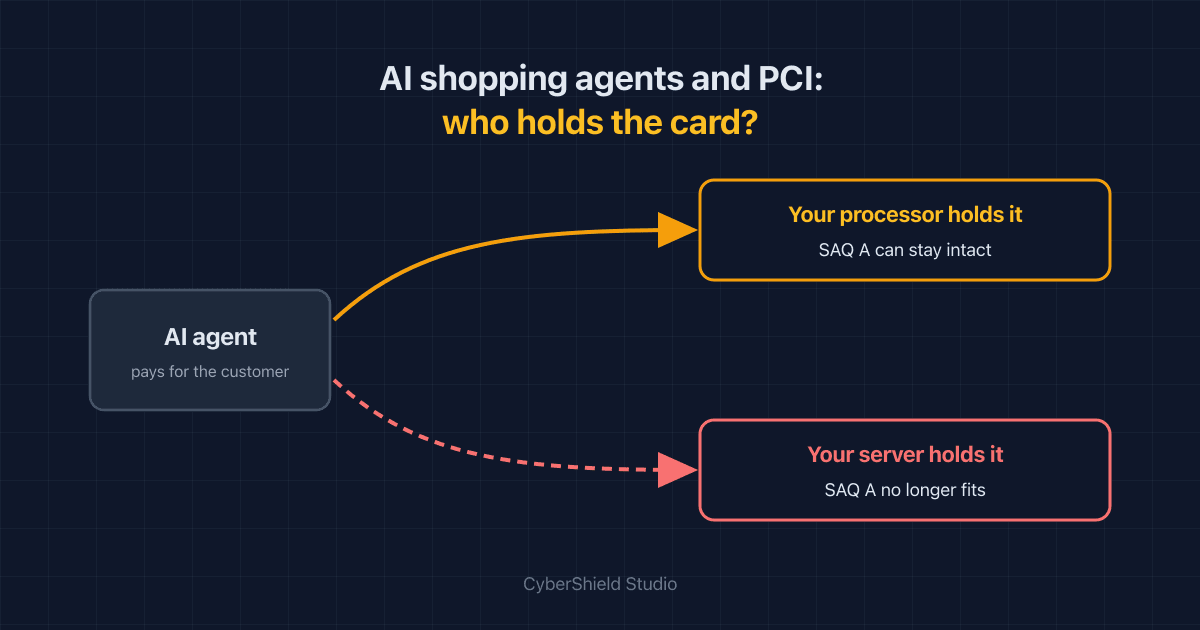
Agentic Commerce and PCI: Will AI Shopping Agents Push You Out of SAQ A?
AI agents that buy on a customer's behalf can leave your SAQ A intact or quietly drag card data onto your servers. Which one depends on a single integration choice.
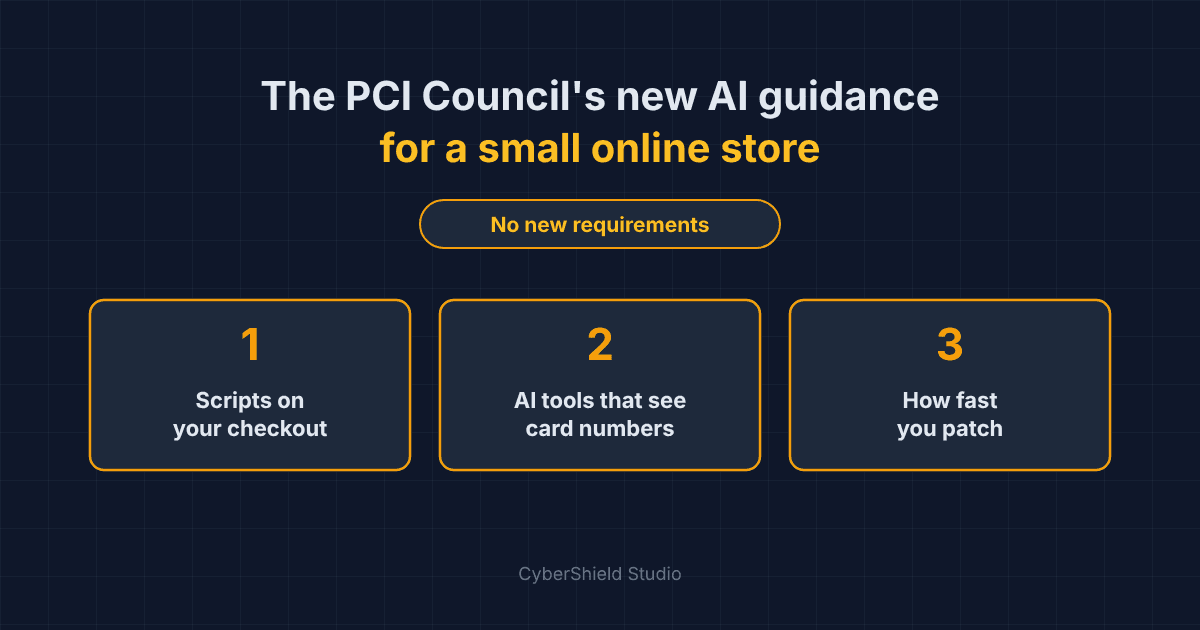
The PCI Council's New AI Guidance: What It Means for a Small Online Store
In September 2026 the PCI Council published 26 pages on AI security. It adds no new rules. For a small store, three parts matter and the rest can wait.
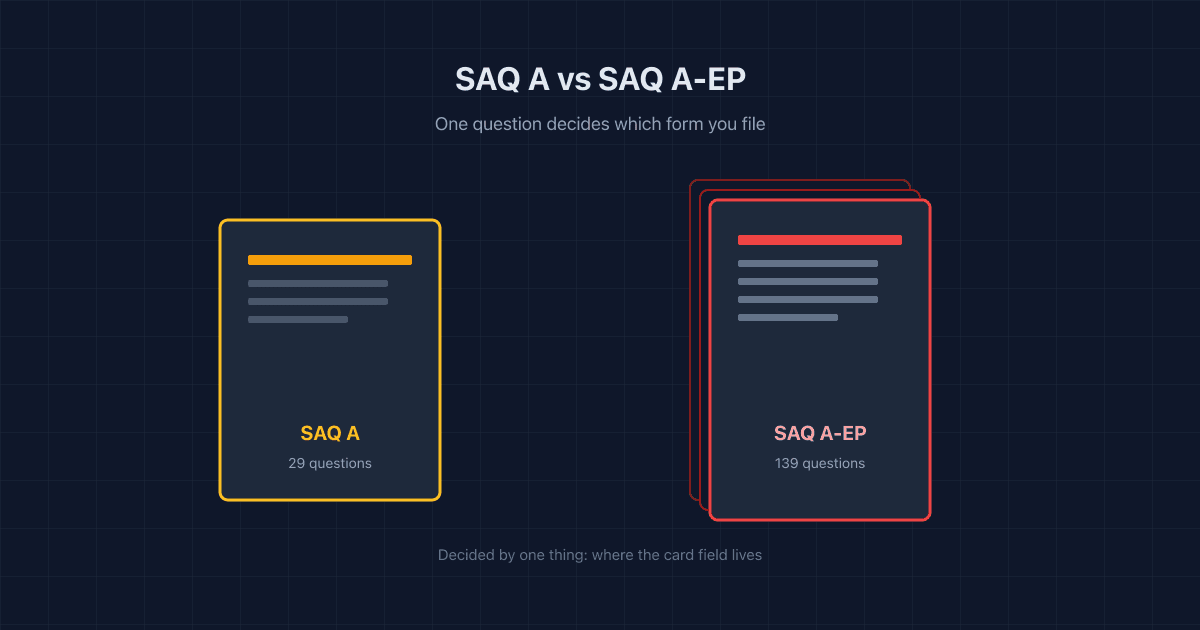
SAQ A vs SAQ A-EP: The 10-Minute Decision Guide
SAQ A and SAQ A-EP come down to one thing: where your card fields live. Here's the test, a processor cheat sheet, and why the difference matters.