Failed Your ASV Scan? A Calm, Step-by-Step Recovery Plan
A failed ASV scan is common and fixable. Here is a calm, step-by-step recovery plan: what a failing result means, what to fix first, and how to rescan to a pass.
A failed ASV scan means the scan found at least one internet-facing weakness serious enough to block a passing result. It is not a breach, a fine, or a shutdown. It is a routine, fixable step. Work in this order: read the report, fix what is real, dispute what is not, then rescan to a clean pass.
If a processor notice or your compliance portal just told you the scan failed, it can feel like the clock is ticking on your ability to take payments. It usually is not that dramatic. Most failing scans trace back to ordinary configuration issues that a developer can resolve in a day or two.
What does a failing ASV scan actually mean?
A failing ASV scan means at least one finding on your internet-facing systems scored CVSS 4.0 or higher. An Approved Scanning Vendor (a company the PCI Security Standards Council authorises to run these scans) grades every issue it finds, and any medium or high finding blocks the pass until you resolve or dispute it.
CVSS is a standard severity score from 0 to 10. The bands that matter here are simple: below 4.0 is low and does not block a pass, 4.0 to 6.9 is medium, and 7.0 to 10.0 is high. Anything in the medium or high range has to be fixed or successfully disputed before the scan can pass. The passing threshold comes from the PCI SSC ASV Program Guide (current under PCI DSS v4.x as of 2026).
Running a scan is not the same as passing one. PCI expects a passing result, so a scan that surfaces a high-severity finding does not count until you fix or dispute the issue and re-run it clean.
Is a failed ASV scan an emergency?
No. A failing scan is routine, and it is common the first time a store runs one. It only becomes a real problem if you ignore it past the deadline your processor or bank sets, which is how a PCI non-compliance fee starts appearing on your statement. Until then, you have room to fix the findings properly and rescan.
The usual causes are mundane. Outdated server software, weak or expired TLS and SSL settings, and management or database ports left open to the internet account for a large share of failures. None of those mean you have been hacked. They mean a setting needs to change.
Treat the report as a to-do list, not a verdict. Your job right now is readiness: work through the findings in a sensible order and get back to a passing result.
What should you do first? The calm order
Work the problem in five steps, in order: get the full report and its deadline, read and sort the findings by severity, separate real issues from false alarms, fix the real ones (or hand them to your developer), then rescan until you get a clean pass. Do them in sequence, not all at once.
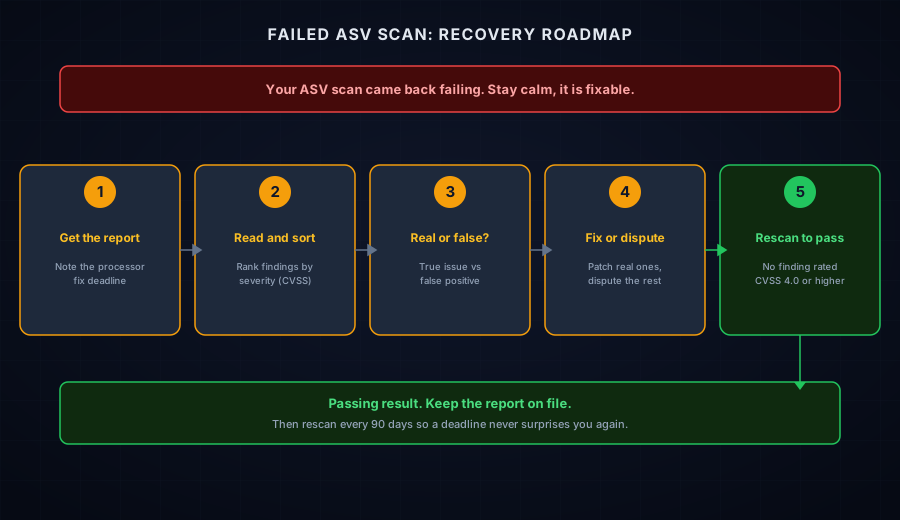
- Get the full report and the deadline. Your ASV portal holds the detailed findings, not just the pass or fail line. Ask your processor or bank when the passing scan is due, and write that date down.
- Read it and sort by severity. Fixing the highest-scoring findings first is what moves you toward a pass. Our companion guide walks through reading the report and prioritising what to fix.
- Separate real issues from false alarms. Scanners flag things that do not always apply to your setup. You can dispute those rather than chase fixes that do not exist. See how to dispute a false positive.
- Fix the real ones. Most fixes are a software update, a configuration change, or closing a port you do not need open. If an outside developer or agency runs your site, this is their work. Give them the report and the deadline.
- Rescan to a pass. Re-run the scan after the fixes. A pass generally means no finding rated CVSS 4.0 or higher. Keep the passing report as evidence for your annual questionnaire and for any bank request.
Which findings should you fix first?
Fix the highest-severity findings first. Anything rated 7.0 to 10.0 (high or critical) is your top priority, then 4.0 to 6.9 (medium). Findings below 4.0 (low) do not block a passing scan, so they can wait. Sorting by that score is the fastest route back to a pass.
Do not try to clear every line at once. A passing scan does not require a perfect one. It requires that no blocking finding, meaning nothing rated 4.0 or above, remains open. Clear the blockers, rescan, and come back to the low-severity cleanup later.
What if a finding looks wrong or does not apply to you?
You do not have to fix a finding that is not real. If the scanner is mistaken, or the issue does not apply to your systems, or another control already covers the risk, you can dispute it with your ASV and attach evidence. A successful dispute removes the finding from the pass or fail decision.
There are three common grounds for a dispute: a false positive (the scanner saw something that is not actually there), not applicable (it is not your infrastructure or you do not run that service), and a compensating control (the risk is handled another way). Each one needs evidence, such as a screenshot, a provider statement, or a log, and the ASV typically reviews it within a week or two. The full process is in how to dispute a false positive on your ASV report.
Disputes are for findings that are genuinely wrong or covered, not a shortcut around real problems. Trying to argue away a legitimate high-severity issue wastes time you could spend fixing it, and it leaves the risk in place.
How do you get back to a passing scan, and stay there?
After you fix or dispute every blocking finding, re-run the scan and confirm it passes with no finding rated CVSS 4.0 or higher. Then save the report. To avoid the same scramble next quarter, set a recurring scan and remediation cadence, because Requirement 11.3.2 expects a passing scan at least every 90 days.
The merchants who never panic about ASV scans are the ones who treat it as a standing quarterly habit, not a fire drill. A scan runs on schedule, findings get triaged the same week, and the passing report goes on file. For the full background on why the requirement applies to online stores, see does SAQ A require quarterly ASV scans.
What does the scan itself cost?
Less than most merchants expect, and it is one of only four things PCI actually charges you for. What PCI compliance costs a small online store breaks down the scan alongside the non-compliance fee, the questionnaire, and the case where you genuinely need an assessor.
Do you even need an ASV scan? A 60-second reality check
If you have a scan to fail, someone has already put you in scope, usually your acquiring bank or your SAQ type. ASV scans are always required for SAQ A-EP and SAQ D. They also apply to most SAQ A e-commerce setups whose own web server hosts the page that redirects to or embeds the third-party payment form, and some processors require them by contract.
That last point matters, because the requirement is not universal to every SAQ A merchant. It hangs on how your checkout is built. If you are not certain which SAQ type you file, resolve that first, since it changes your whole obligation set. The Find My SAQ Type tool is a fast way to check.
Where CyberShield Studio fits
A failed ASV scan is a task, not a verdict. Read the report, fix what is real, dispute what is not, and rescan. If you would rather not run that gauntlet alone, that is exactly the kind of work we help with.
- Start free. Check the external risk signals on your store URL with the Webpage Security Checker, and confirm where you stand with the SAQ A Readiness AI Advisor. No account needed.
- If the report is a mess or the deadline is close, a founder-led checkout review maps your scope, sorts the real findings from the noise, and hands you a prioritised fix list your developer can act on.
- If this repeats every quarter, the cause is usually something that changed between scans. Storefront and Checkout check for exactly that — weekly on the free tier, and on a schedule you pick if you need the evidence records. Neither is an ASV scan, and neither replaces one.
This is a readiness and education resource, not a formal PCI assessment or a guarantee of any scan result.
Next steps
Subscribe to the Newsletter
PCI compliance guides and ecommerce threat intelligence, straight to your inbox.
No spam, unsubscribe anytime. We handle your address as described in our privacy policy.
Related Articles
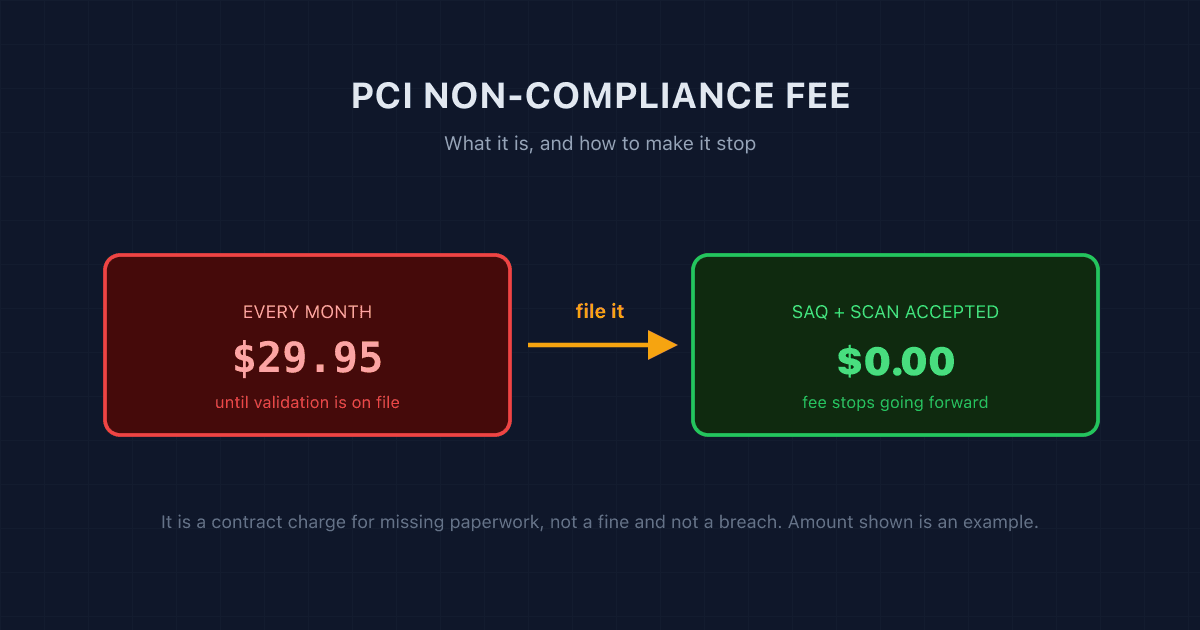
PCI Non-Compliance Fee on Your Statement? What It Is and How to Remove It
A PCI non-compliance fee is a monthly charge for missing validation paperwork, not a fine. Here is what triggers it, what it costs, and the five steps that stop it.
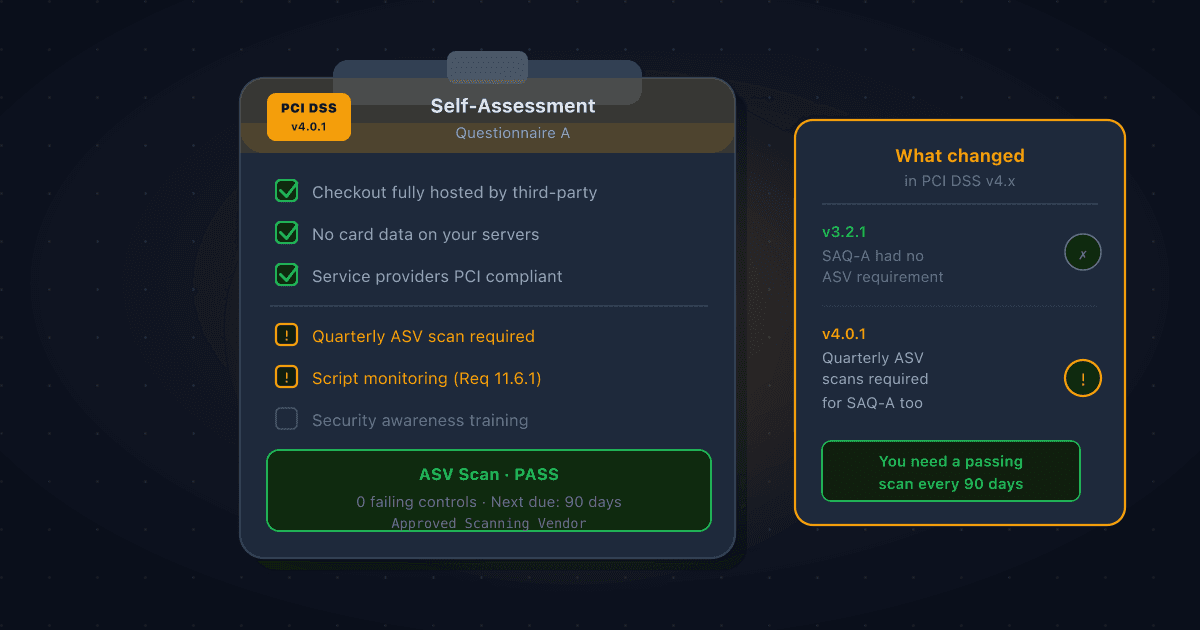
Does SAQ A Require Quarterly ASV Scans? Yes, Here's What Changed in PCI DSS v4.x
Many Shopify and Stripe merchants believe SAQ A means no vulnerability scanning. Under PCI DSS v4.x that is no longer true. Requirement 11.3.2 now requires quarterly ASV scans for SAQ A merchants, here's why, and what to do about it.
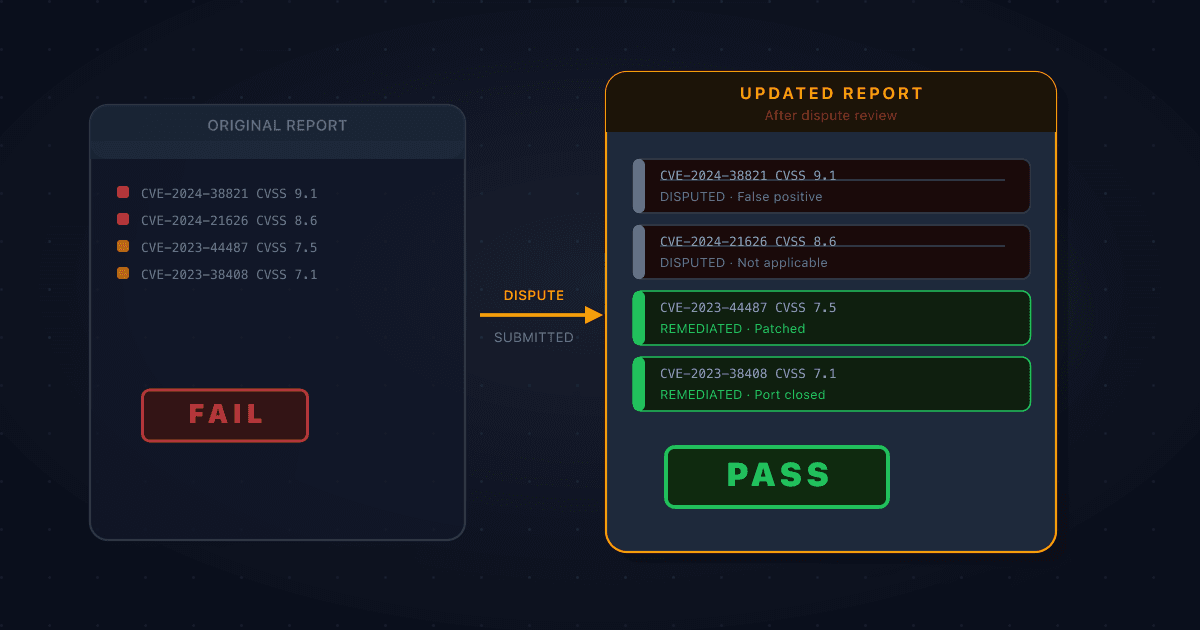
How to Dispute a False Positive on Your ASV Scan Report
Not every finding on a failing ASV scan report is something you caused or can fix. When a vulnerability is misidentified, doesn't apply to your environment, or is mitigated by something the scanner can't see, you can formally dispute it. Here's how the process works and what evidence you need.