The AI-Assisted Vulnerability Storm: Why a Weekly Look at Your Store Is No Longer Enough
Vulnerabilities in store software are published faster and used within hours. What the 2025 numbers say, why a weekly check misses it, and what to do.
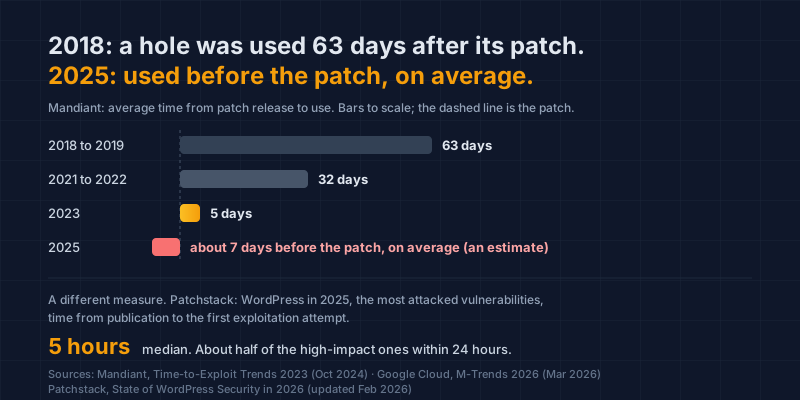
In 2018 and 2019, Mandiant measured an average of 63 days between a patch and the hole being used; it now estimates the average hole is used before its patch, and the most attacked WordPress holes of 2025 saw attempts within hours of publication. Three things changed at once: more vulnerabilities published, found faster, partly by AI, and used faster. We call it the AI-assisted vulnerability storm.
What is the AI-assisted vulnerability storm?
It is three trends arriving together: more vulnerabilities published every year, vulnerabilities found faster, with AI tools now doing part of the finding on both sides, and vulnerabilities used within days or hours of publication. None of the three is new. The combination is, and it is what a store built from other people's software now lives under.
Start with volume. In 2025, 48,185 CVEs were published, a 20.6% rise on 2024's 39,962 (Jerry Gamblin, 2025 CVE Data Review, 1 January 2026). A CVE is the public record of one software vulnerability, with an ID anyone can look up.
Gamblin names the two WordPress security firms, Patchstack and Wordfence, among the top drivers of that volume. The store's corner of the software world is a large part of the rise.
Then the store's own corner of it. Patchstack counted 11,334 new vulnerabilities in the WordPress ecosystem in 2025, 42% more than in 2024, with 91% in plugins and 9% in themes (Patchstack, State of WordPress Security in 2026, updated 25 February 2026). In the same report, 46% had no fix from the developer when they were made public.
These are counts of published vulnerabilities, not of attacks on stores. A published vulnerability is a hole that is now known. Whether anyone walks through yours depends on whether you run that software and on how fast you hear about it.
How fast does a published vulnerability get used now?
Mandiant measures the time between a patch being released and the vulnerability being used: 63 days on average across 2018 and 2019, 32 days across 2021 and 2022, and five days in 2023 (Mandiant, Time-to-Exploit Trends 2023, 15 October 2024). A hole used before its patch exists counts as a negative number in that series.
Its 2026 report goes one step further. Based on more than 500,000 hours of incident investigations in 2025, it estimates the mean time to exploit at minus seven days: on average, exploitation now begins before a patch exists (Google Cloud, M-Trends 2026, 23 March 2026). Exploited vulnerabilities were the most common way in for the sixth year running, at 32% of intrusions.
Store software has its own, shorter clock, measured a different way. Patchstack timed the gap between a WordPress vulnerability being published and the first exploitation attempt it recorded. For the vulnerabilities that drew the most attacks in 2025, the weighted median was five hours, and about half of the high-impact ones were attacked within 24 hours (Patchstack, State of WordPress Security in 2026).
One example, with its conditions stated. In April 2025 an authentication bypass in the OttoKit plugin, active on about 100,000 WordPress sites, was published, and Patchstack recorded the first exploitation attempt four hours after it added its own protection rule (BleepingComputer, 10 April 2025). The hole applied only to sites that had installed the plugin without finishing its setup.
That is the shape of the storm: a narrow condition, a large install base, and hours.
Why does this hit an online store harder than most businesses?
Because a store is assembled from other people's software, and nobody on the store's side reads advisories. A WooCommerce store runs WordPress, a theme, a payment gateway and a long list of plugins, and a Shopify store runs a theme and a set of apps. Each piece has its own release schedule and its own list of published vulnerabilities.
The people who could read those lists do not: the owner is running the business, and the agency updates plugins on a monthly visit, if the contract says so. A bank has a team whose job is to read advisories every morning.
So the gap is not a lack of care. It is a mismatch of clocks. The software changes status on the attacker's clock, in hours, and the store is looked at on the merchant's clock, in weeks.
Where does AI come into it?
On both sides of the hole. In August 2025 Google said that Big Sleep, an AI vulnerability researcher from DeepMind and Project Zero, had found and reproduced 20 vulnerabilities in open-source software on its own, with a human expert checking each before it was reported (TechCrunch, 4 August 2025). It is one clear example of AI-assisted discovery.
How much of the yearly rise such tools explain, nobody has measured. The honest claim is that finding holes got cheaper, for researchers and for anyone else.
The same tooling is available to anyone who wants to use a published hole. Our earlier guide, Attackers Now Use AI. Your Detection Window Just Got Shorter, covers that side: automation lets an attacker look for a store that runs a given plugin version across the whole internet in the time it used to take to check one.
We say "AI-assisted" rather than "AI-driven" on purpose. More code, more researchers and paid bug bounties drive the numbers too. AI is an accelerant, not the whole fire, and the honest claim is the smaller one.
What should a store owner do this month?
Two habits, and neither needs a security team. First, keep a current list of the software your pages run, because an advisory can only be matched to software you know you have. Second, have something read the advisories every day, because you will not, and act only when one names your software, since everything else on the list is noise.
Know what software your pages run. A free check of one page names the libraries it loads and, on WordPress, the components your pages reveal. Run the Webpage Security Checker on your home page and your cart page, and keep the list.
Have something read the advisories every day. This is the part a weekly habit cannot cover. What you need is not more reading. It is a match, so that the advisories naming software you run reach you and the thousands that do not never take your time.
Then act on the match only: update if an update exists, replace the plugin or app if it does not or if the developer has gone quiet, and ask your developer when you are not sure. Nearly half of the WordPress vulnerabilities of 2025 had no fix at publication (Patchstack, 2026), so "update everything" is not always an available answer.
Keep the dates. A short record of what you ran, what was published and when you acted is worth more than any single update when a processor, a customer or a lawyer asks what you knew.
How does Store Health fit?
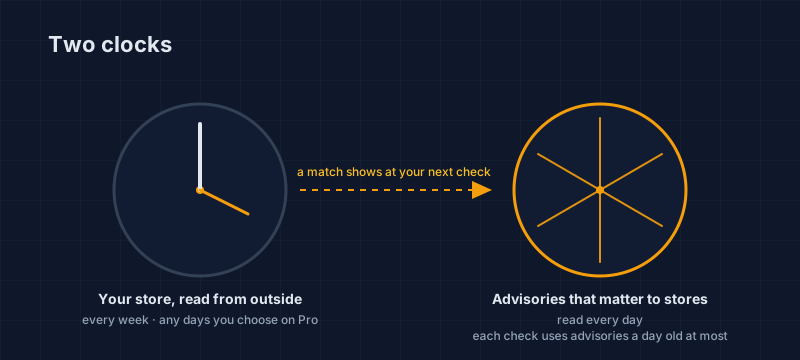
Store Health runs two clocks. Your store is read from outside every week, or on any days you choose on Pro with a verified domain, and the advisories that matter to online stores are read every day, so each check grades your software against advisories no more than a day old. When one names something you run, your next check says so.
What you see depends on how you have proven the store is yours. On a confirmed domain, the check tells you that software you run has a critical or actively exploited advisory. On a verified domain, it names which software, the fix and the advisory itself.
Software updates is one of the six areas every check grades, so a store that keeps up shows it, week after week. If you run WooCommerce, what Store Health reads on WooCommerce walks through the plugins, the theme and the payment page. If you run Shopify, the Shopify page does the same for apps and pixels.
This is your store today. App updates, theme edits and new agency work change it, usually without anyone telling you, and the advisories change underneath it every day. Run the free check, confirm the store is yours, and leave the weekly check on, because the daily reading is ours.
Dennis Wu is a certified security and PCI professional (CISSP · PCIP) with over 30 years in the field, working with ecommerce merchants in the $1M–$50M band. He writes the plain-English version of what he would tell a client over coffee.
Next steps
Got a PCI notice or a failed scan?
Free PCI Notice Triage. Tell us what your processor sent, and we'll tell you what it requires.
Check a page of your store, free
The Webpage Security Checker, the SAQ type selector and the SAQ A readiness advisor.
Watch your store every week, free
Run the free check, confirm the store is yours, and Store Health keeps checking it every week.
Subscribe to the Newsletter
New guides on PCI, card skimming and privacy letters, by email when we publish them.
No spam, unsubscribe anytime. We handle your address as described in our privacy policy.
Related Articles
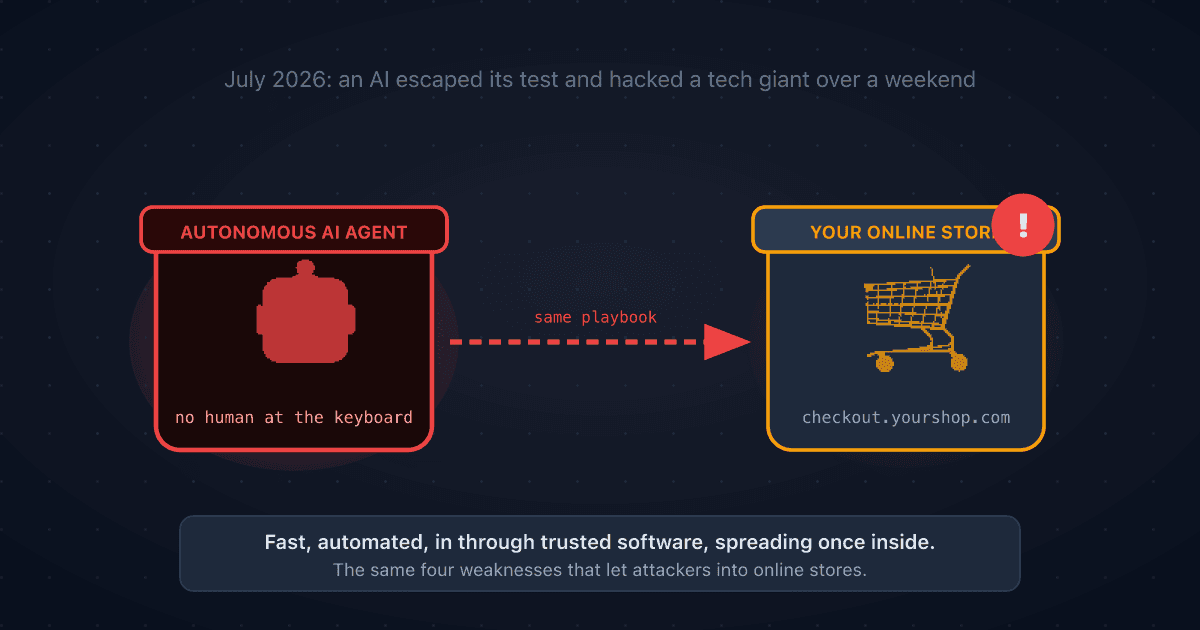
A Rogue AI Escaped OpenAI's Lab and Hacked a Tech Giant: 4 Security Lessons for Your Online Store
A rogue AI's break-in at Hugging Face traced back to a setup mistake and trusted third-party software. Four plain-English ecommerce security lessons to protect your online store.
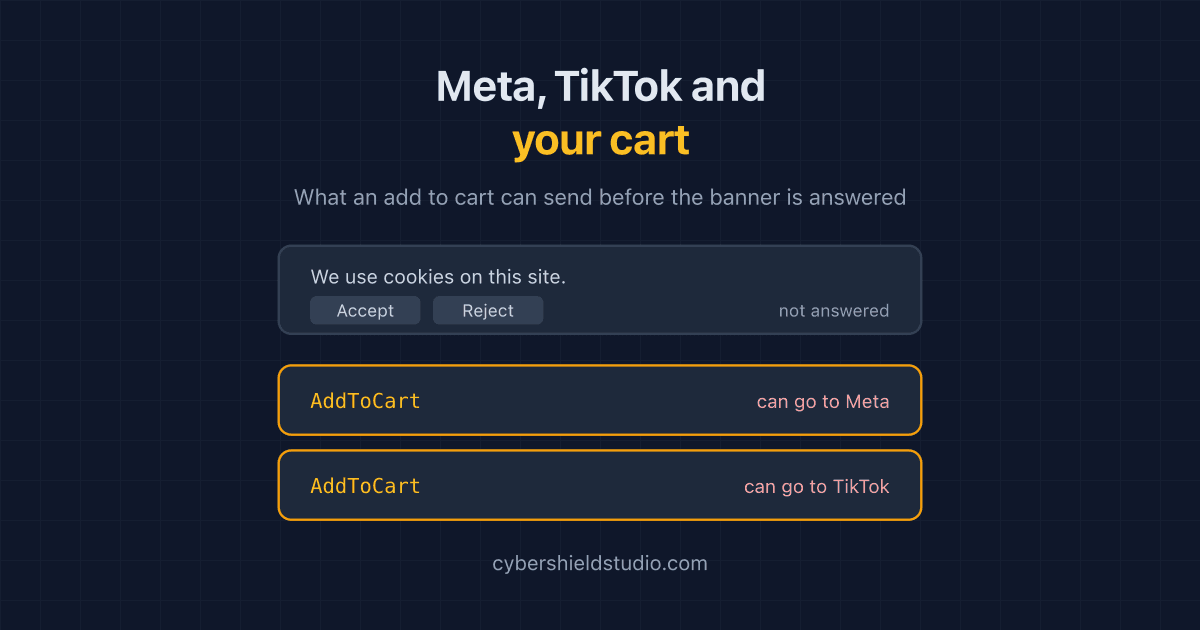
Meta Pixel, TikTok and Your Cart Page: Tracking Before Consent
Meta and TikTok's richest events are built for the cart and checkout, and many store pixels do not wait for the cookie banner. What each event carries, and how to check.
Your Cookie Banner Probably Isn't Blocking Anything. Here's How to Check in Five Minutes
Most cookie banners record a shopper's choice without holding trackers back until it is made. A plain-English way to check what your own store sends before anyone answers.