PCI Non-Compliance Fee on Your Statement? What It Is and How to Remove It
A PCI non-compliance fee is a monthly charge for missing validation paperwork, not a fine. Here is what triggers it, what it costs, and the five steps that stop it.
A PCI non-compliance fee is a monthly charge your payment processor adds when your PCI validation paperwork is not on file. It is a charge under your merchant agreement, not a fine from PCI, and not evidence that your store was breached. It stops once your annual questionnaire, and a passing scan where one applies, are accepted.
Most merchants find it the same way. A bookkeeper flags a new line on the statement, or notices a line that has quietly run for eight months. The amount is small enough to ignore and irritating enough to look up. Ignoring it is the expensive option. The charge repeats forever, and the form it is charging you for still has to be filed.
What is a PCI non-compliance fee, exactly?
It is a recurring charge your acquiring bank or processor applies when you have not validated PCI DSS for your merchant account. Common labels are non-compliance fee, non-validation fee, and PCI non-receipt fee. The trigger is administrative. A form was never filed, or it lapsed.
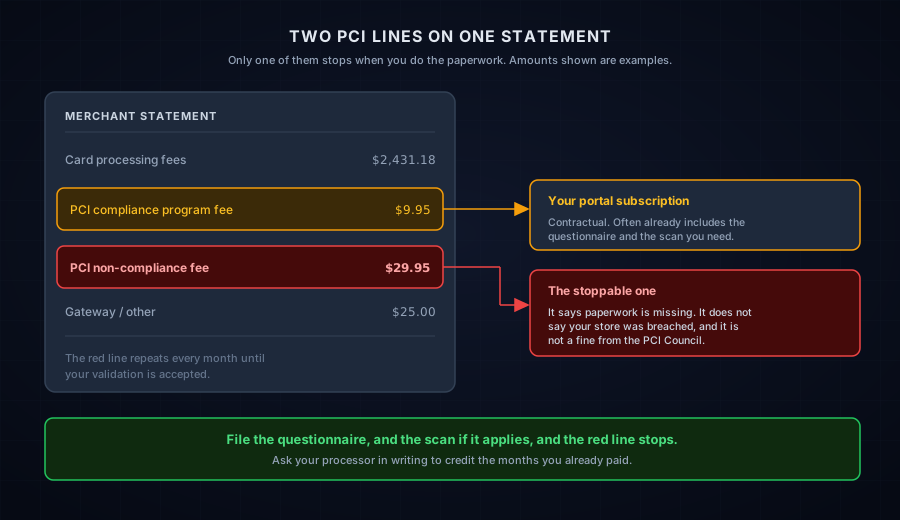
Two different PCI lines often appear on the same statement, and merchants confuse them constantly.
| Line item | What it is | Does it stop? |
|---|---|---|
| PCI compliance fee / PCI program fee | Your processor's compliance portal subscription, often including the questionnaire tool and a scanning service | No. It is part of your pricing, whatever your status |
| PCI non-compliance fee | A penalty charge for missing validation | Yes, once your paperwork is accepted |
Who charges it, and is it a fine?
Your acquiring bank or payment processor charges it, under the merchant agreement you signed. The same party decides what your validation requires and whether what you filed is accepted. The PCI Security Standards Council does not bill merchants and does not assign your validation level.
The Council's own guidance points the same way. Compliance reports go to your acquiring bank and the card brands you do business with (Getting Started with PCI DSS), and its FAQs state that only the acquiring financial institution can assign a merchant's validation level, and that questions about validation and reporting go to your acquirer or the payment brand you deal with.
Card brands sit further up the chain and enforce against acquirers, not against your statement. So the conversation that removes the charge is with your acquiring bank or processor, and nobody else.
The fee is not a statement about your security posture. A store with excellent security and an unfinished questionnaire gets charged. A weak store with a completed questionnaire does not.
Why did it appear on my statement?
Something in your annual validation cycle lapsed or never started. Five causes cover almost every case: you were never enrolled in the portal, the attestation expired, a required scan is missing or failing, the wrong questionnaire was filed, or something about your account changed. All five are paperwork problems, not security incidents.
- You were never enrolled. The welcome email with the portal login arrived during onboarding and nobody opened it.
- The attestation expired. Validation lasts twelve months. Merchants who filed last year get charged this year for not refiling.
- A required scan is missing or failing. Where quarterly external scanning applies, the portal will not mark you validated without a passing result.
- The wrong questionnaire was submitted. A form that does not match your checkout setup can be rejected, which leaves you unvalidated.
- Something changed. A new website, a new payment integration, or a new merchant ID can reset your status.
How much does a year of this cost?
For small and mid-sized merchants the fee usually falls between $20 and $100 a month, according to Clearly Payments (5 November 2025). Merchant Maverick (updated 15 August 2024) puts the industry average nearer $20 to $30, and documents published rates of $29.95 a month at CardConnect and $94.95 a month at TSYS.
Run the arithmetic before you decide to live with it. At $29.95 a month you pay $359 a year. At $94.95 you pay $1,139. Every year, for a questionnaire most SAQ A merchants can finish in a single sitting once they know which one is theirs.
Paying the fee is not an alternative to validating. The obligation stays open while you pay, and the fee keeps running. Merchants who treat it as a subscription arrive at next year's renewal with the same unfinished form and a larger bill behind them.
How do I remove a PCI non-compliance fee?
Work five steps in order: find out exactly what is missing, open the portal you already pay for, confirm which questionnaire applies, file it with any required scan, then confirm the status changed and ask for a credit. Most merchants clear this in a week, and the delay is usually step three.
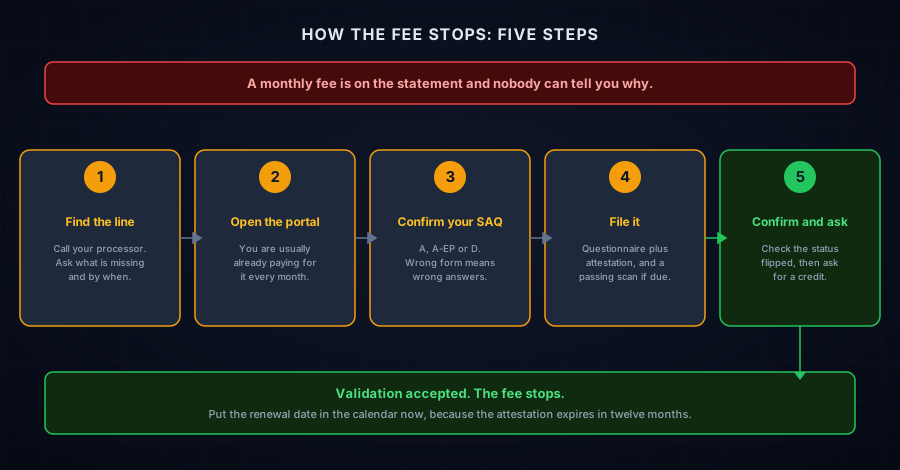
- Find the line and call the number on your statement. Ask three questions and write the answers down: what is missing, which portal do I use, and what is the deadline. Get the portal name in writing, because you will need it later.
- Log into the compliance portal. SecurityMetrics, VikingCloud, Trustwave and Aperia are common. Your login usually exists already. Check what your program fee already covers before you buy a scanner from anyone. Plenty of merchants pay a monthly compliance fee for a portal with a scanner sitting inside it, never log in, and then pay a second fee for not using the first one.
- Confirm which SAQ applies before you answer anything. This is the step people rush, and the wrong form produces answers you should not attest to. If you are unsure, the free Find My SAQ Type tool takes about two minutes.
- Complete the questionnaire, sign the attestation, and run the scan if one is due. If quarterly external scanning applies to you, the portal needs a passing result. Our guides cover reading a failed scan report and working back to a pass.
- Confirm the status flipped, then ask for a credit. Watch the portal show you as validated, save the confirmation, and email your processor asking for the fee to stop and for the months already charged to be reviewed.
Do I need an ASV scan to clear the fee?
Usually yes. Quarterly external scans by an Approved Scanning Vendor (a company the PCI Council authorises to run them) have always been required for SAQ A-EP and SAQ D, and under PCI DSS v4 they now reach most SAQ A stores as well.
Requirement 11.3.2 is in the current SAQ A. The January 2025 revision, effective 31 March 2025, removed the payment-page script requirements 6.4.3, 11.6.1 and 12.3.1 from SAQ A but deliberately kept the scanning requirement. The headlines that month said requirements were removed from SAQ A. Merchants read that as "the scans are gone." The scans stayed.
It is not universal, though. For SAQ A the scanning requirement applies to the merchant systems hosting the page that redirects to or embeds your provider's payment form, so a setup with no such system of your own, phone orders or a payment link you send a customer, sits outside it. Separately, plenty of acquirers require scans by contract whatever the standard says. The full breakdown is in our guide to whether SAQ A requires quarterly ASV scans.
Can I get the fees I already paid back?
Ask for it. Crediting past months is discretionary and governed by your merchant agreement, so nothing entitles you to it. One email is cheap next to what you have already paid, so send it once your validation is accepted and name the months rather than asking for a general refund.
Keep the request specific and unemotional. Name the months, attach the portal confirmation showing your validated status and its date, and ask for those months to be reviewed for credit. A processor that refuses a backdated credit will still stop the charge going forward, which is the larger number.
How do I stop it coming back next year?
Set two reminders. Diary the attestation renewal twelve months out, and the scan cadence if scanning applies to you. The fee returns for the same reason it arrived, which is a deadline nobody owned.
Set a reminder six weeks before the renewal, not on the day. That gives you room to fix whatever a scan finds instead of filing under deadline pressure. Merchants who never see this fee are not more secure than you, they just have the renewal on a calendar.
Where CyberShield Studio fits
A non-compliance fee is a solvable administrative problem, and most merchants can clear it alone once they know which questionnaire is theirs. If the notice is vague or nobody at the processor gives you a straight answer, we do that reading for you.
- Send us the statement line, the notice, or the failed scan through PCI Notice Triage. Redacted is fine. A PCI professional replies within one business day with what it appears to require and your options. Free, and some triages end with "you do not need us."
- Check the external security signals on your store with the free Webpage Security Checker, and confirm where you stand with the SAQ A Readiness AI Advisor. No account needed.
- If your scope is genuinely unclear, or a deadline is close, a founder-led checkout review maps how your checkout is built, which questionnaire matches it, and what your developer has to change.
Written by Dennis Wu, CISSP and PCIP, with 30+ years in security and PCI Level 1 compliance led at scale. This is a readiness and education resource, not a formal PCI assessment, and the self-assessment and attestation remain yours to make.
Next steps
Subscribe to the Newsletter
PCI compliance guides and ecommerce threat intelligence, straight to your inbox.
No spam, unsubscribe anytime. We handle your address as described in our privacy policy.
Related Articles
How Much Does PCI Compliance Actually Cost a Small Online Store?
PCI compliance costs come from four places: non-compliance fees, ASV scans, your own time, and a QSA if your scope grows. Here's the real math for a small store.
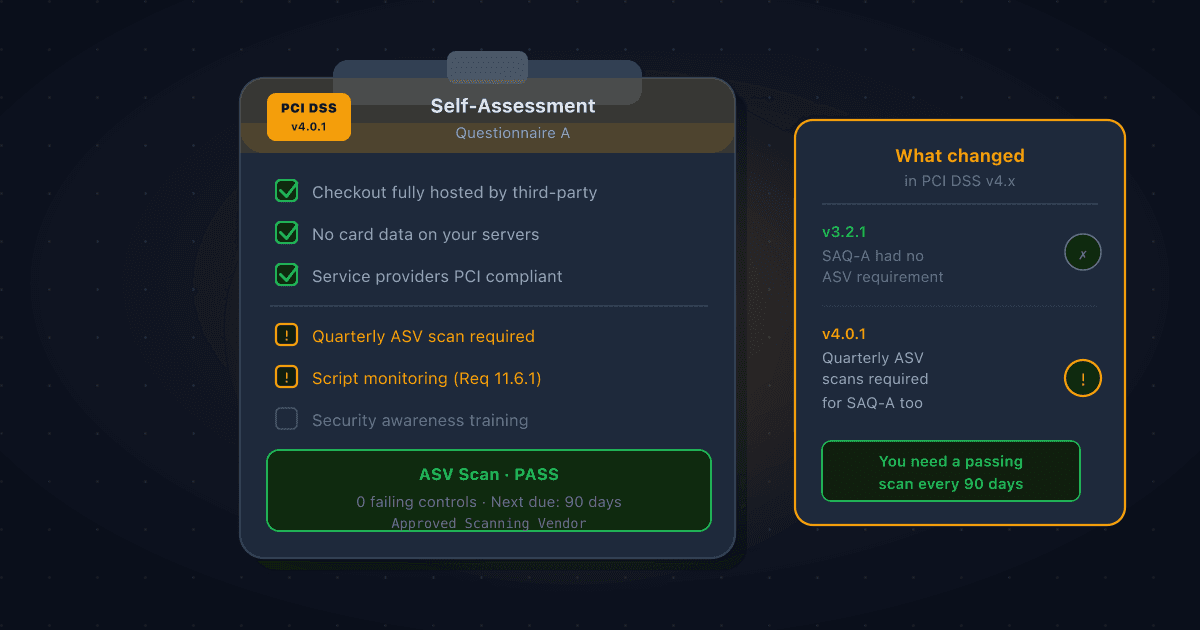
Does SAQ A Require Quarterly ASV Scans? Yes, Here's What Changed in PCI DSS v4.x
Many Shopify and Stripe merchants believe SAQ A means no vulnerability scanning. Under PCI DSS v4.x that is no longer true. Requirement 11.3.2 now requires quarterly ASV scans for SAQ A merchants, here's why, and what to do about it.
What Is a CIPA Demand Letter? A Plain-English Guide for Store Owners
What a CIPA demand letter is, what California's wiretapping law actually says, why many of these claims are weaker than they look, and what to do first.