Your Annual PCI SAQ Is Probably Due: What Changed in 2026, and What to Check
Nothing on SAQ A changed in 2026. What the PCI Council did this year, and a short checklist for renewing your self-assessment questionnaire with no surprises.
Nothing on the SAQ A form changed in 2026. The questionnaire most online stores file is still SAQ A v4.0.1 r1, from January 2025. The PCI Council did three things this year, and none of them adds a question for you. What may have changed is your store, and this year's renewal is where you check that it still matches the answers you signed last year.
By Dennis Wu, a certified security and PCI professional (CISSP · PCIP). I have spent 30+ years in security, including running PCI Level 1 compliance at buuteeq/Booking.com.
What changed in PCI in 2026?
For a store that files SAQ A, nothing that changes the form. The Council asked for comments on the standard, clarified one FAQ for merchants assessed with a Report on Compliance, and published guidance on AI that adds no requirements. Each deserves a sentence. None needs action from you before this renewal.
The standard is still v4.0.1. From 3 June to 20 July 2026, the Council took comments on PCI DSS v4.0.1 and said it "is beginning the next iteration of PCI DSS" (PCI SSC, 3 June 2026). It gave no release date. Anyone selling you readiness for the next version is selling readiness for a document nobody has published.
FAQ 1331 was revised. The Council's bulletin of 4 August 2026 covers merchants whose assessment is written up in a Report on Compliance (ROC), the long-form assessment an outside assessor completes. It says SAQ eligibility criteria should not be used as a guide to which requirements apply in a ROC, unless the merchant's acquirer or payment brand has explicitly agreed (PCI SSC bulletin, 4 August 2026; FAQ 1331).
If you file a questionnaire, it changes nothing on it. The one line in it that every merchant can use: confirm your validation requirements with the bank or processor that collects them.
The AI guidance adds no rules. Security Considerations for AI Systems, published in September 2026, is guidance. I covered what the PCI Council's AI guidance means for a small store when it came out. For a store on SAQ A, it changes nothing you sign. It is worth reading for the part about AI chat widgets on the payment page.
When is my SAQ due?
Your acquiring bank or payment processor sets the date, not the PCI Council. The fastest way to find it is last year's Attestation of Compliance (AOC), the signed section at the end of the questionnaire. The date is on it. If you cannot find it, log in to the compliance portal your processor uses, or ask them which portal that is.
If a monthly charge has appeared on your statement for missing paperwork, the date has already passed. What a PCI non-compliance fee on your statement means explains how to make it stop.
Do I still qualify for SAQ A?
Probably, if nothing about how you take payments changed. But last year's answer was true of last year's store. SAQ A asks an online store to certify two things: every element of the payment form comes "only and directly" from your processor, and your site is "not susceptible to attacks from scripts that could affect" it. A store that changed this year needs to look again.
These are the changes I would look for:
- A new checkout app, payment method or "buy now" button.
- A theme or agency rebuild that moved the card fields onto a page you control.
- A new app or script on the page that sends shoppers to your processor.
- An AI shopping-agent integration, which can move a store out of SAQ A without anyone noticing.
If any of these happened, run Find My SAQ Type again. If the question is SAQ A or SAQ A-EP, the 10-minute decision guide settles it on one question: where the card number field lives.
Do I have four passing scans for the year?
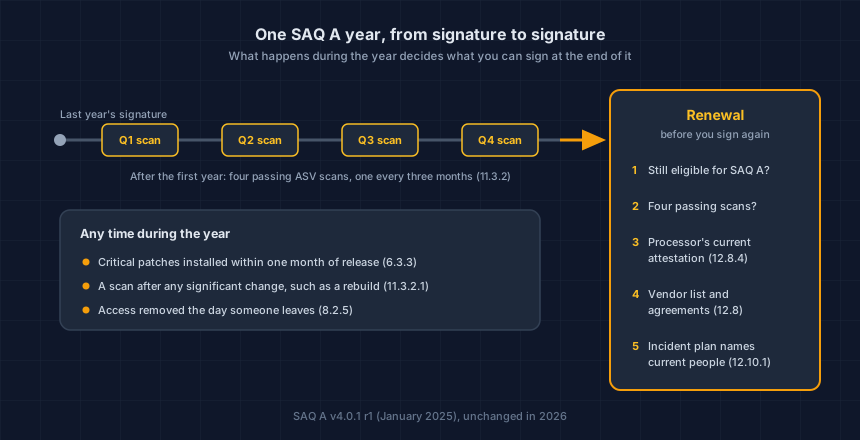
If your SAQ A includes Requirement 11.3.2, you need a passing external scan by an Approved Scanning Vendor (ASV) at least once every three months. After your first year, the form is explicit: "passing scans at least every three months must have occurred." Four quarters, four passing reports.
The requirement covers the website that sends shoppers to, or embeds, your processor's payment form. For most online stores that is the store itself. Does SAQ A require ASV scans? explains when it does not apply.
The first year is the one exception. The form accepts a passing latest scan, a written policy to scan every three months, and proof that findings were fixed. From the second year on, a missing quarter is a missing quarter.
If you fix one thing before you sign, make it the missing quarter. It is the only gap on this form you cannot repair after the fact.
You cannot run a scan in a quarter that has ended. If a quarter is missing or failed, tell your ASV and your processor now, before the renewal date. The failed ASV scan recovery plan covers the conversation.
Requirement 11.3.2.1 adds a scan after any significant change, such as a move to a new host. If you moved platforms or rebuilt the site this year, check that a scan followed.
What else on the form needs a fresh look?
Most SAQ A questions are about people and paperwork, and paperwork drifts too. These five are the ones an ordinary year of business changes without anyone filing anything.
| SAQ A question | What it asks | What to check this year |
|---|---|---|
| 12.8.4 | Monitor each provider's PCI status at least once every 12 months | Get your processor's current Attestation of Compliance. Ask for it, or download it if they publish one |
| 12.8.1 and 12.8.2 | Keep a list of providers that could affect card data security, with written agreements | Any vendor added this year that touches checkout: a new app, a fraud tool, a new agency |
| 6.3.3 | Install critical security patches within one month of release | Was there a month when a critical plugin or app update waited longer? |
| 8.2.5 | Remove access for people who leave, immediately | Former staff, contractors and last year's agency, in the store admin and the hosting account |
| 12.10.1 | Keep an incident response plan, including who tells the card brands and your bank | Do the names and phone numbers in it still belong to people who work with you? |
The patch question is the one that has become harder. For the most attacked WordPress vulnerabilities of 2025, the first attempts came within hours of publication, and the AI-assisted vulnerability storm has the sources.
What should I do before the renewal date?
Book an hour. With the evidence in one folder, SAQ A is one sitting. Without it, the sitting waits on everyone you have to chase. Do these in order, because each one feeds the next.
- Find the due date on last year's Attestation of Compliance or in your processor's portal.
- Re-check eligibility against what changed on your store this year. Use Find My SAQ Type if anything did.
- Count your passing scans. Four, one in each quarter, if this is not your first year.
- Download your processor's current attestation for question 12.8.4.
- Update the vendor list, the access list and the incident plan.
- Answer the form, and keep every report and attestation you used in one folder for next year.
How does Store Health fit?
SAQ A has you confirm, once a year, that your site is not susceptible to script attacks. You sign it about the store as it is that day. The store you sign about next year will have changed many times in between.
Store Health reads your store from outside every week, or on the days you choose on Pro with a verified domain, and tells you what changed, including any new script on the page that sends shoppers to checkout. It does not choose your SAQ type and it does not fill in the form. It gives you a dated record of what was running, so the answers you sign describe the store you actually run.
This is your store today. App updates, theme edits and new agency work change it, usually without anyone telling you. Run the free Webpage Security Checker on the page that sends shoppers to checkout, confirm the store is yours, and keep the weekly check running between renewals.
Dennis Wu is a certified security and PCI professional (CISSP · PCIP) with over 30 years in the field, working with ecommerce merchants in the $1M–$50M band. He writes the plain-English version of what he would tell a client over coffee.
Next steps
Got a PCI notice or a failed scan?
Free PCI Notice Triage. Tell us what your processor sent, and we'll tell you what it requires.
Check a page of your store, free
The Webpage Security Checker, the Website Tracking Checker and the SAQ type selector.
Watch your store every week, free
Run the free check, confirm the store is yours, and Store Health keeps checking it every week.
Subscribe to the Newsletter
New guides on PCI, card skimming and privacy letters, by email when we publish them.
No spam, unsubscribe anytime. We handle your address as described in our privacy policy.
Related Articles

PCI Non-Compliance Fee on Your Statement? What It Is and How to Remove It
A PCI non-compliance fee is a monthly charge for missing validation paperwork, not a fine. Here is what triggers it, what it costs, and the five steps that stop it.

Does SAQ A Require ASV Scans? Usually, Under PCI DSS v4
Usually, yes. PCI DSS v4.x put quarterly ASV scans (Requirement 11.3.2) in SAQ A, including many stores that outsource checkout. What changed, and what to do.

Failed Your ASV Scan? A Calm, Step-by-Step Recovery Plan
A failed ASV scan is common and fixable. Here is a calm, step-by-step recovery plan: what a failing result means, what to fix first, and how to rescan to a pass.