The Optimizely Hack: What a Skimmer in a Trusted Script Means for Your Checkout
On November 16, 2026, Optimizely scripts on 178 organizations' sites carried a card skimmer. Which checkouts were exposed, and what to check on yours.
On November 16, 2026, an attacker added malicious code to Optimizely scripts that 178 organizations load on their websites, 20 of them retail and fashion brands. For part of that day the code included a card skimmer. No store was broken into. Whether a shopper's card was exposed came down to how each checkout takes the card.
That last sentence is the part a store owner can act on, so most of this post is about it.
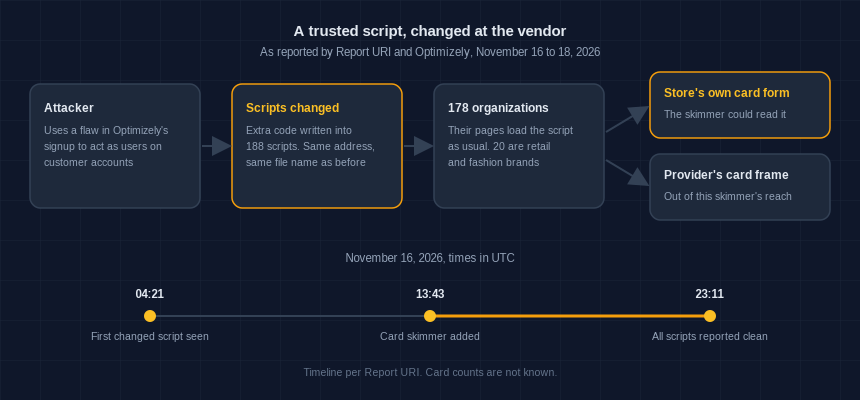
What happened at Optimizely?
Optimizely sells a tool for A/B testing web pages, and its customers load an Optimizely script on their sites to run those tests. On November 16 an attacker used a flaw in Optimizely's account signup to act as users on customer accounts, then wrote extra code into those customers' scripts. Optimizely has confirmed this.
Scott Helme of Report URI checked 1,611 Optimizely scripts that evening and found the code in 188 of them, belonging to 178 organizations (Report URI, November 16, 2026, updated November 17). Banks were the largest group at 32. Retail and fashion came third with 20, and Report URI names IKEA, ASOS, Levi's and American Eagle among them.
Report URI saw the first injection at 04:21 UTC and says every infected script was clean by 23:11 UTC. That is about 19 hours. Optimizely's own report to customers puts the first change later, at 07:51 UTC, according to Corgea's summary of it. If you search your logs, start from the earlier time.
Optimizely says fewer than 5% of its customers were affected, that it has closed the flaw and removed the code, and that it contacted every Web Experimentation customer directly (Optimizely status page, November 18, 2026). It has not published a full root-cause report yet.
What did the malicious code do?
Three things, per Report URI. It swapped cryptocurrency wallet addresses shown or copied on a page for the attacker's own. From 13:43 UTC it also watched forms for a card number, expiry date and security code and sent them to the attacker's server. On iPhones and iPads it loaded further attack code.
The card skimmer was live for between seven and nine and a half hours, depending on when each site's script was cleaned. In US Eastern time that is from 8:43 on a Monday morning into the early evening.
The known take is small. Report URI counted about $7,000 in crypto sent to the attacker's wallets. The number of cards is not known to anyone but the attacker. Report URI says it cannot see it, and per Corgea, Optimizely told customers it can see when the code loaded but not what it captured.
StepSecurity's analysis (updated November 20, 2026) adds one caution on the iPhone part. Public scans show the attack pages being delivered. They do not show any device being taken over.
Which checkouts were exposed to the skimmer?
Checkouts where the card is typed into the store's own form, on a page that loaded an infected Optimizely script. The skimmer could read those fields. It could not read a card typed into a payment provider's frame, such as the hosted card fields from Stripe or Adyen. Report URI and Optimizely both say so.
A frame is a small window inside your checkout page that the payment provider serves from its own servers. The browser does not let a script on your page read what is typed inside it. That rule is old and boring, and on November 16 it was the difference between a card being readable and not.
Two limits on that good news. First, it applies to this skimmer. A script on your page that cannot read the frame can still send the shopper somewhere else to pay, which is what a script planted through Shopify apps did with a fake checkout. Second, the script still ran on the page, with access to everything else on it.
If your checkout loaded an Optimizely Web Experimentation script on November 16 and shoppers type cards into your own form fields, treat it as a possible card exposure until your logs say otherwise. Optimizely cannot tell you what was captured.
Why didn't a list of approved domains catch it?
Because the domain was already approved. The code arrived from Optimizely's own address, under the same file name, with a valid certificate. A site that trusted Optimizely's script trusted this one. Helme's point is that allowing Optimizely's domain was never going to help, and he is right.
It is also not new. On October 24 a skimmer was added to an analytics file that every Convertr checkout loaded, also without the address changing. Different attacker, different vendor, same weak point. For the pattern in general, see what a supply chain attack is.
What did help was a content security policy, a setting your site sends that tells the browser which places scripts may come from. Report URI crawled the affected organizations' sites and found 68 with no policy at all. Only 24 had one strict enough that the browser refused the attacker's script.
One difference from Convertr matters if you monitor your own scripts. There I said to compare the file, not only the domain. An Optimizely script changes every time a marketer edits a test, so a changed file is normal and tells you little. What was new here was a domain the page had never contacted before. Watch for both.
Would regular monitoring have caught this?
A weekly check, probably not. The code was live for about 19 hours, and a check that runs once a week most likely looks on a different day. A daily check has a chance. I would not sell any outside monitor, ours included, as the thing that catches a one-day attack on someone else's server.
What catches it inside the day is the vendor, or reports from visitors' own browsers. A content security policy can run in a report-only mode that tells you when a page contacts a new domain. Report URI sells that kind of reporting, so weigh its view accordingly, but the mechanism is sound.
What regular checking gives you is a fast answer to the question every Optimizely customer faced on November 17: was that script on our checkout, and since when? A store with a current list of what its checkout loads answers in minutes. A store without one starts by emailing its agency.
Does this change anything for PCI?
No rule changed. A merchant who files SAQ A confirms that the site is not susceptible to attacks from scripts that could affect the payment page, and that the payment page elements come only and directly from a compliant payment provider. This incident is a plain example of what that confirmation covers.
The wording comes from the eligibility criteria in the PCI Security Standards Council's SAQ A for PCI DSS v4.0.1 (revision 1, January 2025). The merchant makes that confirmation, not the payment provider and not a consultant. Your acquirer decides which questionnaire applies to you.
The two requirements written for payment page scripts, 6.4.3 and 11.6.1, apply to merchants on SAQ A-EP and SAQ D. They were removed from SAQ A in the January 2025 revision. We explain both in the payment page script requirements and the split in SAQ A vs SAQ A-EP.
One detail for anyone who leans on a vendor's PCI label. Corgea's summary of Optimizely's interim report says the separate script address Optimizely offers for payment pages served the injected code too. I have not read that report myself, so take it as secondhand until Optimizely publishes its final one.
What should a store owner check this week?
Six things, in this order. The first two are about November 16. The other four are about the next vendor this happens to, because the weak point is any outside script on the page where cards are typed. None of them needs a security team, though some need your developer.
- Find out whether Optimizely Web Experimentation is on your store. Ask whoever runs your marketing tests. Some stores serve the script from their own domain, so searching the page for "optimizely" is not conclusive.
- If it was on a page with your own card fields, call your payment processor. Pull your web logs from 04:00 UTC on November 16 and ask Optimizely in writing whether your project was changed.
- Take testing and marketing scripts off the checkout page. Unless you are testing the checkout itself, an A/B testing tool has no job there. Every script you remove is one fewer vendor to trust.
- Ask your developer where the card fields live. In the payment provider's frame, or in your own form? Get the answer in writing.
- Ask for a content security policy that lists your script sources, then check it. Our free Security Settings Checker reads the policy your site sends. For your developer: Report URI found that
'strict-dynamic'and'unsafe-eval'let this attack through. - Keep a list of what your checkout loads. The audit guide takes about fifteen minutes, and this explains why each script is a risk.
What happens after the first check?
It goes out of date. A one-off check shows what your checkout loads today. It cannot tell you that a marketing tool was added to the checkout page last Tuesday, or that a script you already trusted now contacts a domain it never did before.
This is your store today. App updates, theme edits and new agency work change it, usually without anyone telling you. Run a free check, verify your domain, and keep it running.
Dennis Wu, CISSP, PCIP, has 30+ years in security and PCI. This is a readiness and education resource, not a formal PCI assessment.
Sources: Scott Helme, Report URI, "World's Largest Brands Infected With Malware Via Optimizely," November 16, 2026 (updated November 17) · Optimizely status page, "Web Experimentation Security Incident," updates of November 17 and 18, 2026 · StepSecurity, "OPTIMJACK," updated November 20, 2026 · Corgea, OPTIMJACK research note, updated November 18, 2026.
Next steps
Got a PCI notice or a failed scan?
Free PCI Notice Triage. Tell us what your processor sent, and we'll tell you what it requires.
Check a page of your store, free
The Security Settings Checker, the Website Tracking Checkerand the SAQ type selector.
Watch your store every week, free
Run the free check, confirm the store is yours, and Store Health keeps checking it every week.
Subscribe to the Newsletter
New guides on PCI, card skimming and privacy letters, by email when we publish them.
No spam, unsubscribe anytime. We handle your address as described in our privacy policy.
Related Articles

The Convertr Skimmer: How a Hacked Analytics Script Reached Every Checkout
Sansec says attackers added a card skimmer to one analytics file that every Convertr checkout loaded. What happened, and what store owners should check.

Third-Party Scripts Are a Hidden Skimming Risk on Your Checkout, Sucuri Warns
Sucuri warns that ordinary third-party scripts and tags can turn into a skimming risk on checkout pages. Here's how, and what PCI DSS 6.4.3/11.6.1 ask you to do.

AI Agents Are Breaking Into Online Stores for $25 Each: What to Check on Your Checkout
Gambit Security says one operator used AI agents to break into online stores for about $25 a target and plant card skimmers. What was found, and what to check.