Shopify App Supply Chain Attack: How Shoppers Were Sent to a Fake Checkout
Sansec says attackers wrote a script into Shopify apps' stored settings and sent shoppers to a fake checkout. Your theme stayed clean. What to check on your store.
Sansec reports that attackers wrote a script into the stored settings of Shopify apps, so shoppers on at least 71 stores were sent from the real checkout to a fake one that took their card details. Store themes were untouched and each wave lasted hours. Any app that prints settings on your pages is part of your checkout.
That last point is the one to act on this week.
What happened?
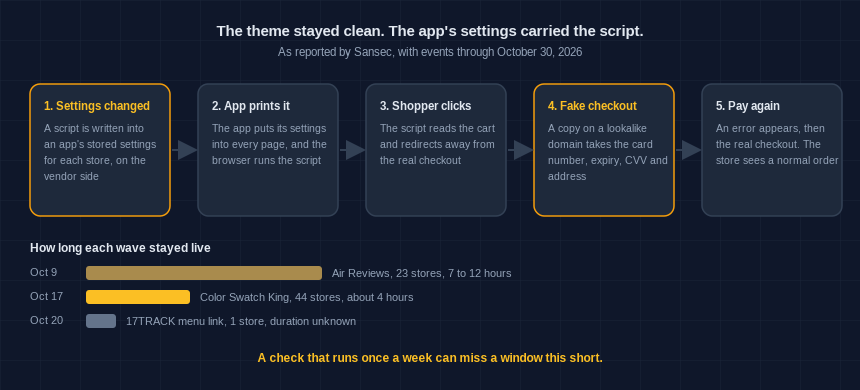
In mid-October, shoppers on Shopify stores running Hulk Product Options, Selleasy and Swym Wishlist Plus were sent to a fake checkout. A developer, Roman Zipp, documented it on October 10, and the three vendors confirmed that someone had changed their app's settings. Sansec then found the same gang in four more apps: StarApps Color Swatch King, AVADA Air Reviews, Trustify Reviews and 17TRACK. That was 71 more stores (Sansec, first published October 18, 2026 and updated since). Everything below is Sansec's reporting unless noted.
Sansec calls the campaign Checkiout, after a misspelled marker in the attackers' code. The fake checkout kit has been in use since July 2026. Sansec only counts stores its crawler saw, so 71 is a floor. Only the app vendors know the real number.
How did the script get onto stores that changed nothing?
Through the apps' stored settings. Each affected app keeps settings for each store and prints them into every page. In Air Reviews, the attacker added a carousel-heading setting the dashboard doesn't even offer. Its value closed the app's settings block and opened a script of its own.
Two more examples. Color Swatch King runs a custom_scripts field on every page, and per StarApps' help pages only its support team writes it, so merchants have no editor for it. And on one 17TRACK store, a navigation menu item had code for a title. Menus are meant to be clicked, not executed.
Sansec suspects the attacker used 17TRACK's own access to the store. It hasn't confirmed that.
Where was the break-in?
Probably at the vendors, not at the stores. Sansec says that in both large waves, dozens of unrelated stores changed within minutes, using settings that merchants cannot edit.
Three vendors have said something. Selleasy says an attacker used one of its internal tools, Swym rotated credentials after an unauthorized configuration change, and Qikify, hit in July, blames a leaked credential. StarApps, AVADA and Trustify have said nothing Sansec could find. Ask them.
What did the shopper see?
A copy of a Shopify checkout on a lookalike domain, showing their own cart and asking for card number, expiry, CVV, name, address, phone and email. Sansec says the newest version then shows a message that the payment route is temporarily unavailable and sends the shopper back to the store's real checkout to pay again. That last step is the nasty part. The shopper pays a second time, the order goes through, and nothing on your side looks wrong.
In September, a merchant told Sansec a customer had been sent to the fake checkout. The merchant checked their theme, scripts, pixels, Tag Manager, apps and DNS and found nothing. The customer only stopped because the payment page said Vitamin A Swim, a swimwear brand that had nothing to do with the store.
How long did each wave last?
Hours. Sansec recorded AVADA Air Reviews on 23 stores on October 9, live for 7 to 12 hours. Color Swatch King followed on October 17 on 44 stores, live for about four hours, between 19:00 and 23:17 UTC. The app has about 13,000 installs. It was delisted from the Shopify App Store the next day and, by October 30, was loading again with custom_scripts empty. 17TRACK was delisted on October 20.
A check that runs once a week can miss a window of four hours. That is the limit of scheduled checks, ours included. We suggest weekly as a floor, and for a window like this one it is not enough on its own, which is why the steps below lean on vendors, shopper reports and checks after every app change.
What should a Shopify store owner do this week?
Six things.
- List your apps and note which ones print anything on your storefront or menus: reviews, swatches, tracking, navigation. Remove the ones you do not use, under Settings, then Apps and sales channels. Here is how scripts arrive on a Shopify store.
- Ask each of those vendors who at their company can change a store's settings, whether every change is logged, and how their internal tools are protected.
- If you run Color Swatch King, Air Reviews, Trustify or 17TRACK, follow Sansec's steps. For Color Swatch King, review checkouts started on October 17 between 19:00 and 23:20 UTC, and check that
custom_scriptscontains only scripts you asked StarApps for. For Air Reviews, review October 9 up to 03:00 UTC on October 10. For 17TRACK, delete menu items that link to/apps/17TRACKor have HTML in their title. - Brief whoever answers customer email. A customer who reports a payment page with another brand's name, or a "payment route unavailable" message right after entering a card, is a same-day incident. Sansec's advice for those shoppers is to ask their bank for a new card.
- Click checkout from your cart after any app change, and watch the address bar. A checkout on an unfamiliar domain is wrong.
- Tell your payment processor if you suspect card theft.
Does this mean Shopify apps are not safe?
Should you panic and rip out your apps? No. Should you treat every app that prints code on your pages as part of your checkout? Yes, because its security is yours. Most stores run more apps than they use, so this is a good week to delete a few. We cover what Shopify handles and what stays with you in is Shopify PCI compliant. For the wider pattern, see what a supply chain attack is, and for a similar case, how a hacked analytics script reached every Convertr checkout.
Keep watching after the first check
You can't check every hour. You can check after every app change, and you can make your vendors explain how settings get written. Here is what to watch and how often.
This is your store today. App updates, theme edits and new agency work change it, usually without anyone telling you. Run a free check, verify your domain, and keep it running.
Next steps
Got a PCI notice or a failed scan?
Free PCI Notice Triage. Tell us what your processor sent, and we'll tell you what it requires.
Check a page of your store, free
The Security Settings Checker, the Website Tracking Checkerand the SAQ type selector.
Watch your store every week, free
Run the free check, confirm the store is yours, and Store Health keeps checking it every week.
Subscribe to the Newsletter
New guides on PCI, card skimming and privacy letters, by email when we publish them.
No spam, unsubscribe anytime. We handle your address as described in our privacy policy.
Related Articles

The Optimizely Hack: What a Skimmer in a Trusted Script Means for Your Checkout
On November 16, 2026, Optimizely scripts on 178 organizations' sites carried a card skimmer. Which checkouts were exposed, and what to check on yours.

The Convertr Skimmer: How a Hacked Analytics Script Reached Every Checkout
Sansec says attackers added a card skimmer to one analytics file that every Convertr checkout loaded. What happened, and what store owners should check.

AI-Powered Card Skimmers: How a Rogue Script Hides on a WooCommerce Checkout
Modern card skimmers use AI to mutate their code and impersonate legitimate plugins. Here's how they hide on WooCommerce checkouts, and what store owners can do to find them.