Your Agency Deployed on Friday. What Changed on Your Storefront?
An agency release can change your store's scripts, cookie banner and checkout by accident. What to ask your agency after each deploy, and what to check on Monday.
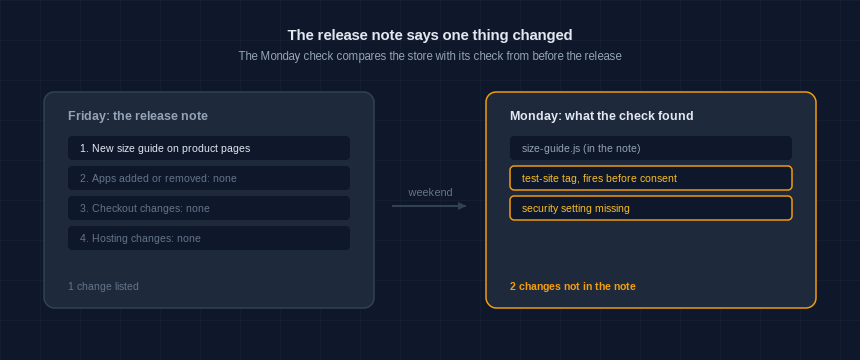
Your agency's release changed more than the feature you asked for. A deploy can bring along a tag from the test site, lose your cookie banner, drop a security setting or add an app's script to the checkout. None of that breaks the store, so nobody reports it. Ask for a written release note, then check the store the next working day.
I am a certified security and PCI professional (CISSP · PCIP), in the field for more than 30 years. For a store that an agency maintains, the cheapest security control I know of is a one-page release note. It costs the agency ten minutes, and it answers the first question anyone asks when something goes wrong: what changed, and when?
Why does an agency release change things nobody asked for?
Because a release moves a whole working copy of your store, not one feature. Theme files, app settings and the tag manager travel together. Anything that got into the test copy while the work was being built goes live with the feature you paid for.
Agencies build on a copy of your store first, usually called a staging site. That copy changes too. A developer adds an analytics tag to measure the new page, or installs an app to try an idea, and the tag or the app is still there on release day.
Friday is not the problem. The problem is that nobody looks at the whole store afterwards. The agency tested the feature it built. Nobody tested everything else.
How often does a release go wrong?
For more than half of software teams, one release in ten to one in five needs an immediate fix. That is from Google's 2024 DORA report. The fastest teams get it down to one in twenty, and the slowest are at 40%. Those numbers only count problems somebody noticed.
DORA calls this the change fail rate, and the 2024 report (page 13) describes it as the chance that a release will "unintentionally lead to immediate, additional work." It surveys software teams in general, not ecommerce agencies, so read it as a rough guide.
That last point is the gap. A broken checkout gets noticed in minutes. A tracker that now fires before your cookie banner, or a security setting that disappeared, breaks nothing. No customer complains, so it never turns into "additional work", and no survey counts it.
What can a release change on your store?
Five things, one for each area a store check reads: the scripts that reach your checkout, trackers that start before consent, security settings, the connection's encryption, and the software versions your pages name. Any of them can move in a release that was only meant to change a product page.
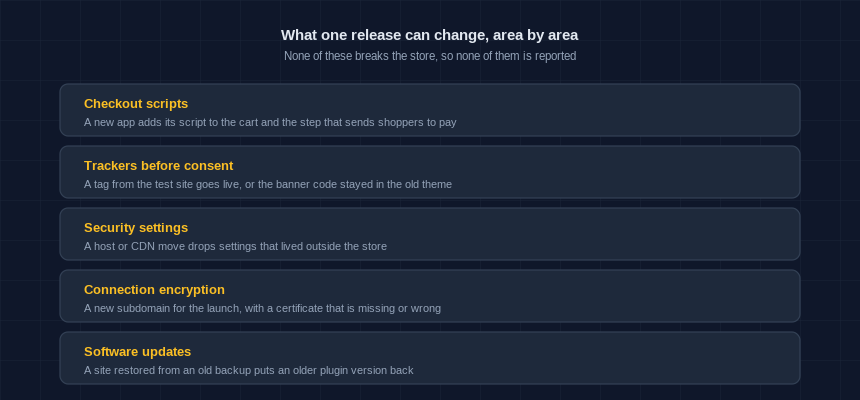
Checkout scripts. A new upsell or reviews app adds its script to every page, including the cart and the step that sends shoppers to pay. A new payment plugin or a custom checkout button can also move where card details get typed. If the card field moves onto your own page, your PCI paperwork changes with it: here is how SAQ A and SAQ A-EP differ.
Trackers before consent. A tag added on the test site comes along. Or the cookie banner's code was pasted into the old theme, and the new theme does not have it. Either way, data goes to an ad platform before the shopper answers. A banner can still appear on screen while this happens, so check whether yours actually blocks anything.
Security settings. Some protections live with your host or your CDN (the service that delivers your pages quickly), not in the store itself. These are settings that tell a shopper's browser which sites your pages may load code from, among other things. A host move is the usual way they disappear, and it gives no error.
Connection encryption. A launch often adds a new subdomain. If its certificate is missing or wrong, shoppers get a browser warning.
Software updates. On WooCommerce or Magento, a site restored from an older backup, or a plugin held at the version the developer tested with, can put old software back on your pages. That matters more than it used to, because attackers now move from a published vulnerability to an attack in days.
Agencies are not careless here. Their tests check what they built, because that is the job they were hired for. Nobody was hired to watch the rest.
Who is responsible for what the agency changed?
You are. Hiring an agency moves the work, not the responsibility. If a release puts a tracker in front of your cookie banner, a privacy complaint names your store, not your agency. A contract can say who fixes the problem and who pays for it. It does not change whose store it is.
Johannes Briel made the same point about payment pages in Lifestyle & Tech on 16 November 2026. Using gateways, cloud providers or developers does not remove a merchant's PCI responsibilities, and the people who add a script are the ones who should justify it.
If you file SAQ A (the shortest PCI self-assessment, for stores whose card form is hosted by the payment provider), two requirements touch agency work. Requirement 12.8.1 asks you to keep a list of the service providers "that could affect the security of account data." Requirement 12.8.2 asks for written agreements with them. If your agency can edit the page that sends shoppers to pay, put it on that list. The PCI Council's guidance of 10 November 2026 names hosting and remote administration among the services that can affect a customer's security. Your acquirer, the bank that handles your card payments, has the final word on what the list needs.
One more. Where your SAQ calls for quarterly external scans by an approved scanning vendor (ASV), Requirement 11.3.2.1 also asks for a scan "after any significant change." A new host or a new platform can be one. Here is when SAQ A requires those scans.
What should you ask your agency for after each release?
A short written release note, every time. It needs six lines: what changed, which apps and scripts were added or removed, whether anything touched the checkout, whether the cookie banner or tag manager changed, whether hosting, the domain or the CDN changed, and who can roll the release back.
Copy this into your next message to the agency:
Release note, please, for each deploy to the live store:

1. What changed (one line per change)
2. Apps, plugins or scripts added or removed
3. Anything that touches the cart, checkout or payment step
4. Any change to the cookie banner or tag manager
5. Any change to hosting, domain, DNS or CDN
6. Who can roll this back, and how fast
Put it in the contract as a deliverable. If your agency already keeps a changelog, you are only asking for a copy.
What should you check on Monday?
Check your homepage and cart the next working day and compare the result with a check from before the release. Anything that changed and is not in the release note is your question for the agency. Two free checkers and one click through to the payment page cover it.
- Check the two pages a release touches most. Put your homepage and cart page through the Security Settings Checker. It reads them the way a shopper's browser does, so your agency does not need to install anything.
- See who gets data before consent. The Website Tracking Checker lists where those pages send data before the cookie banner is answered.
- Click through to payment yourself. Add something to the cart, go to checkout and look at the address bar on the page that asks for card details. It should be the payment provider you expect.
- Hold the results against the release note. Each change in the note should explain something on the list. What is left over is what you send back.
Without the comparison, a check shows the store today and looks complete. What the release did is in the difference between the two checks. Here is what to watch, and how often.
On our Free plan, the store is read once a week and compared with its previous check. You can also run a manual check yourself on the morning after a release, so you do not have to wait for the weekly read.
What if the release changed something it should not have?
Send it back to the agency with the page, the change and the date you spotted it. Then decide how fast. Anything new on the checkout, and any data going out before consent, goes back the same day. A new font or an extra analytics call can wait for the next release.
Most of these fixes are small. Usually it is one tag to remove or one snippet to put back. The hard part was never the fix. It was knowing there was something to fix. For the longer version of how to rank changes, read the drift guide.
Keep watching after the release
Your agency ships again next month. That release deserves a note and a check too.
This is your store today. App updates, theme edits and new agency work change it, usually without anyone telling you.
Run a free check, verify your domain, and keep it running. Then each release gets a before and an after, and the release note has something to be checked against.
Dennis Wu is a certified security and PCI professional (CISSP · PCIP) with more than 30 years in the field. He works with ecommerce merchants in the $1M–$50M range who rely on an outside developer or agency and have no security team of their own. Want a second pair of eyes on what a release changed? Get in touch or see what a monitored plan covers.
Sources: DORA, Accelerate State of DevOps Report 2024, Google Cloud, p. 13 · Johannes Briel, "Beyond the checkout button: Securing the scripts behind online payments," Lifestyle & Tech, 16 November 2026 · PCI SSC, SAQ A v4.0.1 r1, Requirements 11.3.2.1, 12.8.1 and 12.8.2 · PCI SSC, "PCI SSC Publishes New Guidance on Understanding PCI DSS Third-Party Service Providers," 10 November 2026
Next steps
Got a PCI notice or a failed scan?
Free PCI Notice Triage. Tell us what your processor sent, and we'll tell you what it requires.
Check a page of your store, free
The Security Settings Checker, the Website Tracking Checkerand the SAQ type selector.
Watch your store every week, free
Run the free check, confirm the store is yours, and Store Health keeps checking it every week.
Subscribe to the Newsletter
New guides on PCI, card skimming and privacy letters, by email when we publish them.
No spam, unsubscribe anytime. We handle your address as described in our privacy policy.
Related Articles

Meta Pixel, TikTok and Your Cart Page: Tracking Before Consent
Meta and TikTok's richest events are built for the cart and checkout, and many store pixels do not wait for the cookie banner. What each event carries, and how to check.

A New Script Appeared on Your Store. Would You Know?
Third-party scripts arrive on ecommerce stores through app updates, theme edits and agency deploys, with no alert. What drift is, how to detect website changes, and what matters.

Website Change Detection for Ecommerce: What to Monitor, and How Often
A normal website monitor tells you the banner image changed. For a store, the changes that matter are in the code. Here is what to watch and how often to check.